
Configuring a cookie consent message in Tripcart ensures compliance with privacy regulations and informs users about data collection. Follow these steps to set up your cookie consent message.
Accessing Cookie Consent Settings #
- Log in to the Tripcart Dashboard.
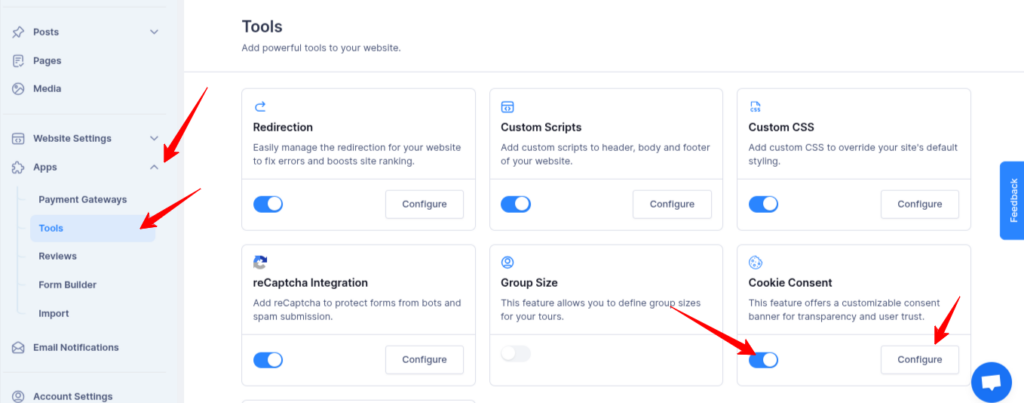
- In the left sidebar, navigate to Apps > Tools.
- Locate the Cookie Consent section.
- Toggle the switch to Enable Cookie Consent.
- Click the Configure button to proceed.
Setting Up Cookie Consent #
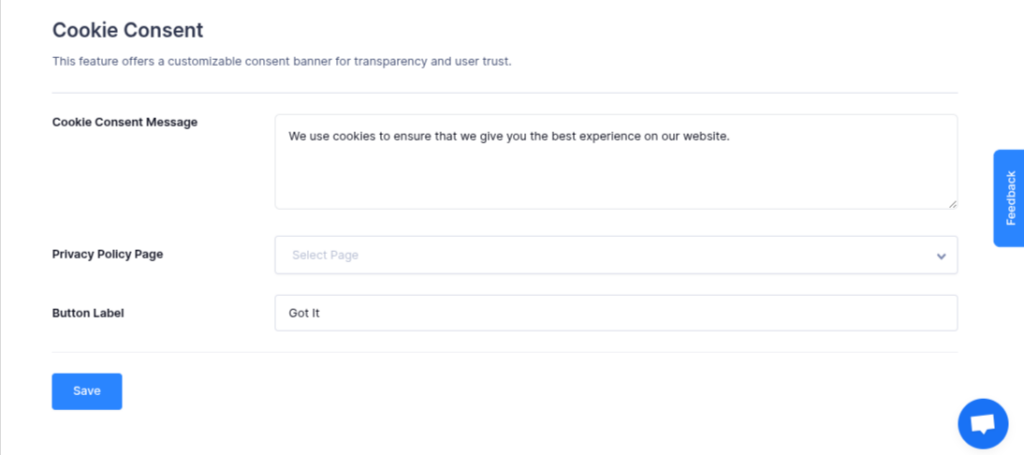
- Cookies Consent Message: Enter a message to inform users about cookie usage.
- Privacy Policy Page: Link to your privacy policy page to comply with regulations.
- Button Label: Customize the text for the consent button.
- Click Save to apply the settings.
By following these steps, you can ensure transparency and compliance regarding cookie usage on your website.
📧 If you face any issues or have questions, please reach out to our support team or initiate the chat located on the right.