
Revolut Payment Gateway is a fast, secure, and flexible solution for accepting online payments, offered by Revolut Business. Designed for modern e-commerce and SaaS platforms, it enables businesses to accept payments via credit/debit cards, Apple Pay, and other digital wallets with competitive fees and real-time settlement.
Steps to configure Revolut #
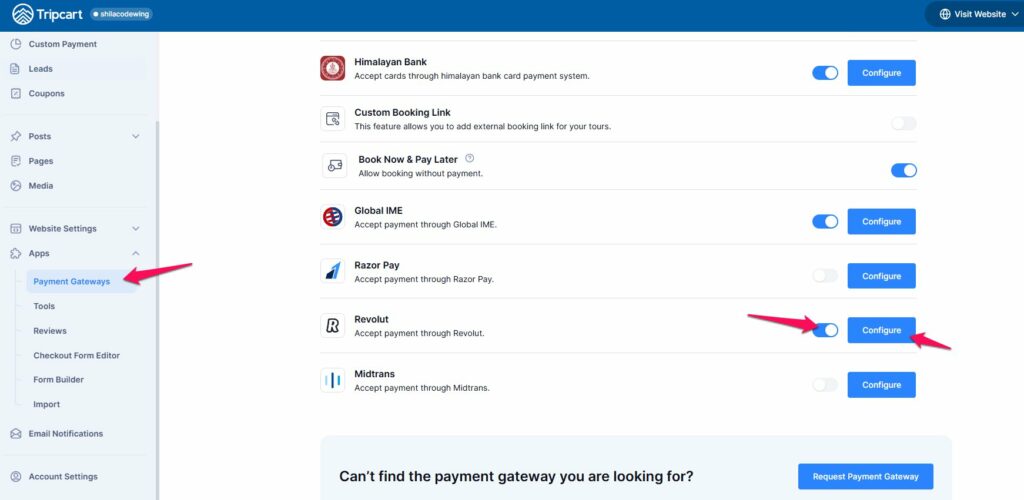
Navigate to Payment Gateways: #
- Go to the Dashboard > Apps.
- Select Payment Gateways.
Enable Revolut Payment Gateway: #
- Find the Revolut payment gateway in the list.
- Toggle the switch to enable the Revolut payment gateway. This will make the Revolut option appear on the checkout page.
Connect Revoult #
- Click on the Configure button next to the Revolut payment gateway.
- You will be prompted to add the Payment Label, Public Key, and Secret Key.
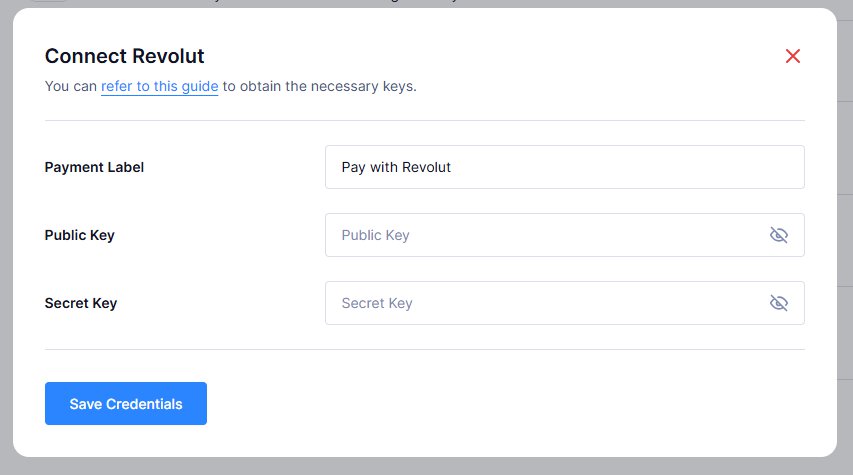
For generating these keys, you will first need to follow the below steps:
- Log in to your Revolut Business account by visiting the Revolut Business login page and entering your credentials.
- Once you’re logged in, click on your profile icon (top-right corner of the dashboard).
- Navigate to APIs → Merchant API from the dropdown menu.
- In the Merchant API settings page, you’ll find your Production API Keys, including:
- Public Key
- Secret Key
- Copy and securely store these keys for use in your payment gateway integration.
Save Credentials:
- Once you have obtained all these keys, enter them in the respective fields on the Tripcart configuration page.
- Click Save Credentials to save the information.
📧 If you face any issues or have questions, please reach out to our support team or initiate the chat located on the right.