
Getnet is the new payment network and acquiring service from Banco Santander in Chile, supporting both physical and digital commerce. It accepts debit, credit, and prepaid cards, along with contactless payments, installment plans, tips, and more.
TripCart integrates Getnet to help travel businesses in Chile securely accept online payments. With this integration, customers can complete bookings and payments directly through the TripCart platform, ensuring a smooth and localized checkout experience.
Steps to Configure Getnet #
1. Navigate to Payment Gateways #
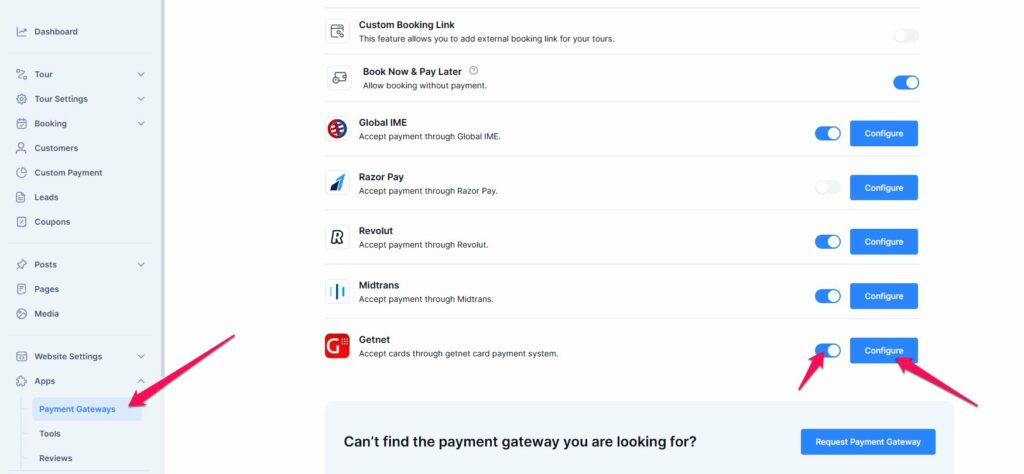
- Go to your Dashboard > Apps
- Select Payment Gateways
2. Enable Getnet Payment Gateway #
- Locate Getnet in the list of available payment gateways.
- Toggle the switch to enable the Getnet gateway. This will make it available on the checkout page.
3. Connect Getnet #
- Click the Configure button next to the Getnet gateway.
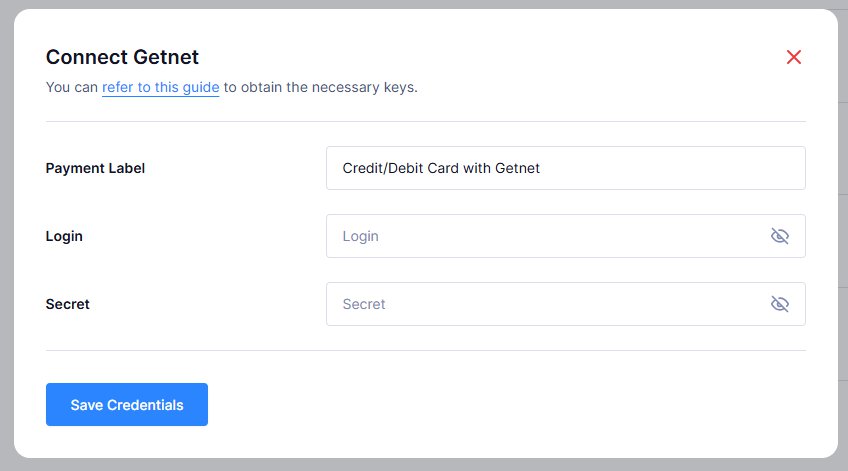
- You will be prompted to enter the following details:
- Payment Label
- Login
- Secret
4. Generate API Credentials #
To obtain the required API credentials, follow these steps:
- First, you’ll need to log in to your account here.
- You will receive these keys via your account Dashboard.
- Copy those credentials from your account.
5. Save Credentials #
- Enter the obtained credentials in the respective fields on the Getnet configuration page.
- Click Save Credentials to apply the changes.