
Tripcart allows you to customize the permalink slugs for default pages, such as tour archives and custom taxonomy archives, to improve SEO and user experience. Follow the steps below to update these settings.
Steps to Configure SEO Settings
- Log in to Dashboard: Access your Tripcart account and go to the Dashboard.
- Go to SEO Settings: In the left sidebar, navigate to Website Settings > SEO.
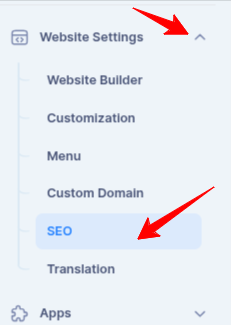
Steps to Configure Permalink Settings
- Navigate to Permalinks Section: Locate the Permalinks settings under SEO.
- Update Slugs for Default Pages:
- Tour: Customize the permalink slug for the main tour archive.
- Destination: Modify the slug for destination archives.
- Activity: Update the slug for activity archives.
- Blog Listing Page: Set the slug for the blog listing page.
- Post Category: Change the slug for post category archives.
- Save Changes: Once you have updated the settings, click Save to apply the changes.
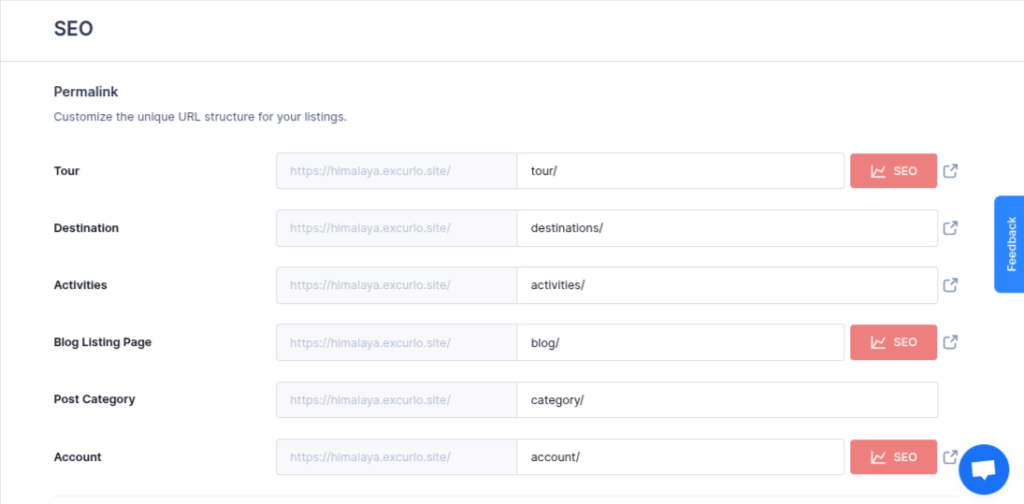
By following these steps, you can ensure your URLs are structured optimally for SEO and user navigation.
📧 If you face any issues or have questions, please reach out to our support team or initiate the chat located on the right.