
The Google Translate tool allows you to offer your website content in multiple languages, making your tour website accessible to a global audience. This feature is especially useful for travel and tourism businesses, where visitors may speak different languages or prefer reading in their native language. By enabling Google Translate, you give your visitors the flexibility to translate any page on your site into the language they understand best.
How to Enable Google Translate #
You can turn on Google Translate from your dashboard in just a few clicks.
Steps:
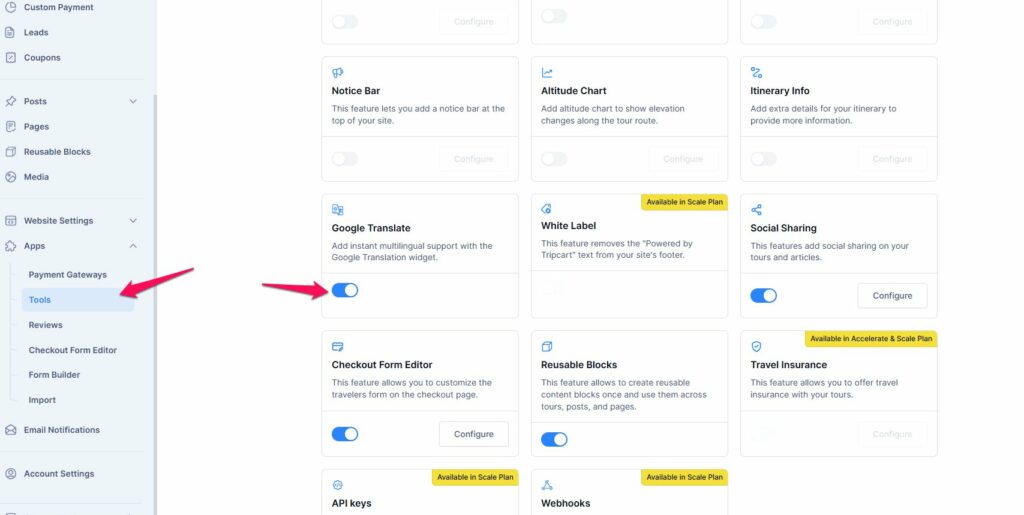
- Go to Dashboard → Apps → Tools → Google Translate
- Enable the toggle to activate the feature
- Once enabled, the Google Translate icon will start appearing on the frontend of your website
After switching it on, there is no further configuration required.
How Google Translate Works #
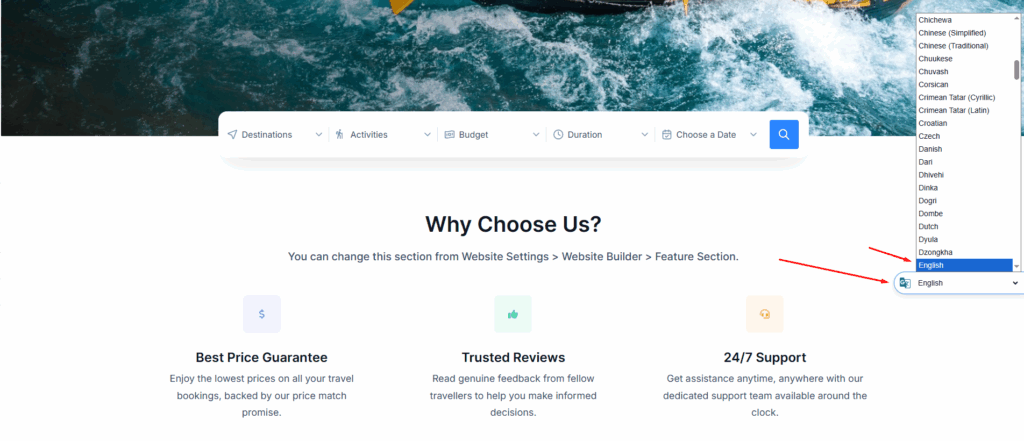
Once enabled, Google Translate adds a multilingual icon to every page of your website.
Visitors can click this icon and choose their preferred language from the dropdown menu. The page will then be translated instantly.
Important things to know:
- The translation is handled entirely by Google Translate.
- No additional setup or configuration is needed after enabling the feature.
- Once a language is selected, it does not need to be chosen again for each page. After the page loads completely, it will automatically be translated into the selected language.
📧 If you face any issues or have questions, please reach out to our support team or initiate the chat located on the right.