
Tripcart allows you to easily migrate your WordPress posts and pages, ensuring a smooth transition of your content. Follow the steps below to import your posts and pages seamlessly.
Accessing the Import Feature #
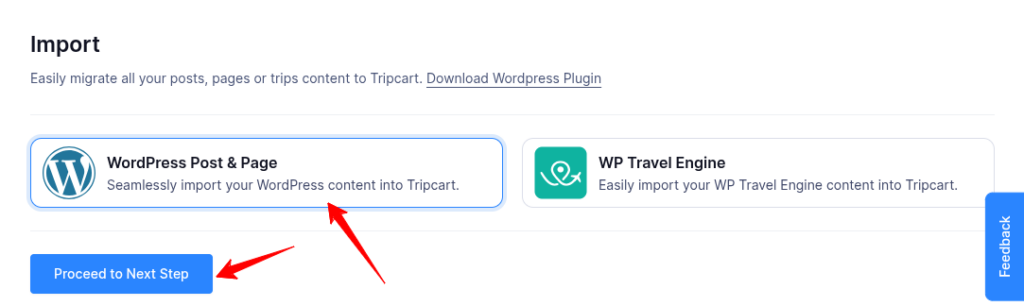
- Log in to the Tripcart Dashboard.
- Navigate to Apps > Import.
- Select WordPress Post & Page and click Proceed to Next Step.
Installing the WordPress Plugin #
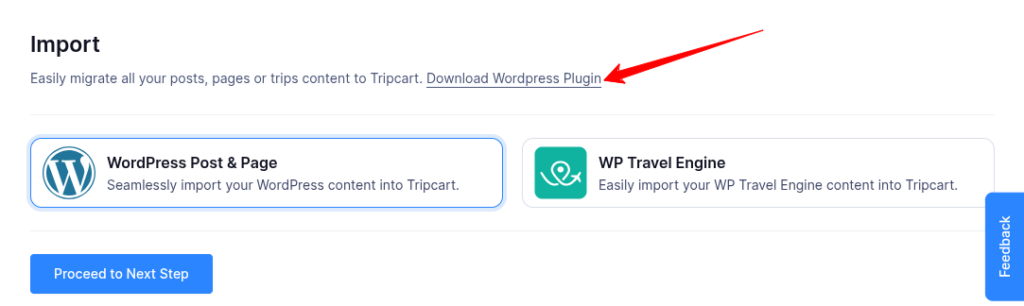
- Download the WordPress to Tripcart Plugin by clicking on “Download WordPress Plugin”.
- Install and activate the plugin on your WordPress website.
Importing Your Content #

- Enter your WordPress website URL and click Proceed to Next Step.
- The system will search for posts and pages, displaying the total number of each found on your website and shows an estimated time for the import process.
- Click Confirm & Start Import to begin the migration.
Viewing Imported Content #

- Once the import is complete, you can view your migrated content.
This process ensures a seamless migration of your content from WordPress to Tripcart.
📧 If you face any issues or have questions, please reach out to our support team or initiate the chat located on the right.