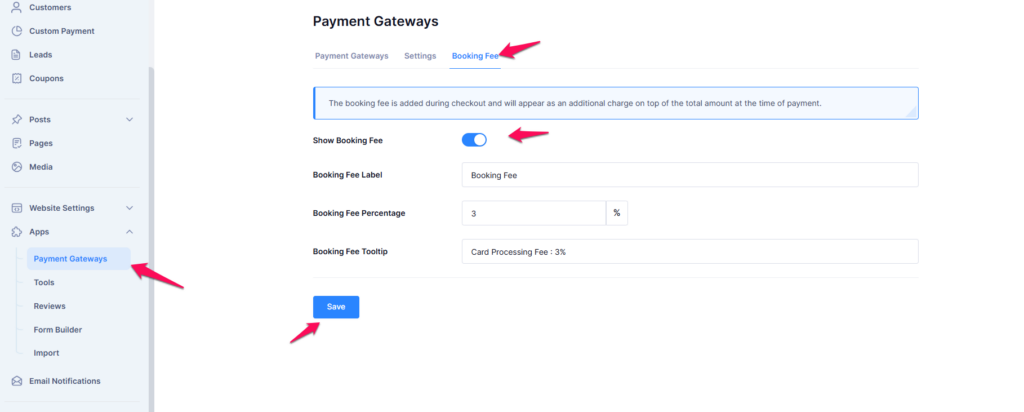
The Booking Fee feature is designed for tour agencies selling tours and travel experiences. It allows agencies to charge an additional fee on top of the total booking amount during checkout. This fee can be used to cover payment processing costs, administrative fees, or other service charges associated with bookings. Please note that this feature is available in the Premium plan only.
How to Enable and Configure the Booking Fee Feature #
Step 1: Access the Booking Fee Settings #
- Log in to your admin panel.
- Navigate to Apps from the left menu.
- Click on Payment Gateways under the Apps section.
- Select the Booking Fee tab at the top.
Step 2: Enable the Booking Fee #
- Toggle the Show Booking Fee switch to enable the feature.
- Once enabled, additional configuration fields will appear.
- Booking Fee Label – Enter a custom label for the fee (e.g., “Booking Fee”). This label will be visible to customers at checkout.
- Booking Fee Percentage – Define the percentage of the booking total that will be charged as the booking fee (e.g., 3%).
- Booking Fee Tooltip – Add a short description to inform customers about the fee (e.g., “Card Processing Fee: 3%”).
- Click the Save button to apply your settings.
- The booking fee will now be included in customer invoices and reflected at checkout.