
Tripcart allows you to easily import tours from other websites. This is especially useful if you are migrating from another platform and want to bring your existing tour content into Tripcart without recreating everything manually.
What This Feature Does #
- Imports tour content directly from an external tour page URL
- Automatically organizes the content into the appropriate sections
- Saves time and simplifies the migration process
How to Import Tours #
Follow the steps below to import your tours:
- Go to Dashboard > Tours > All Tours
- Click on the Import Tour button
- Enter the URL of the tour page from your external website
- Click on Import
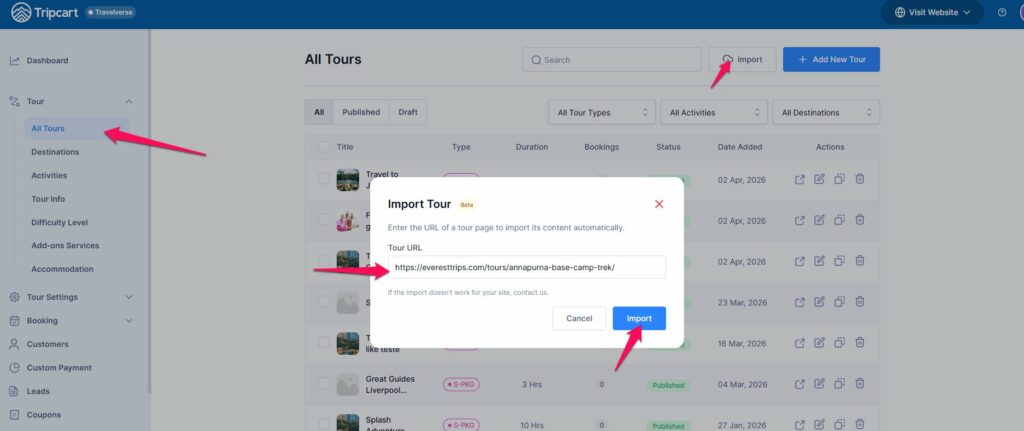
The system will take a few minutes to fetch and import the content.
After Importing #
- The imported content will be added to the respective sections of the tour
- You can click on the Edit icon to review and customize the tour as needed
- Once ready, publish the tour to make it live on your Tripcart website
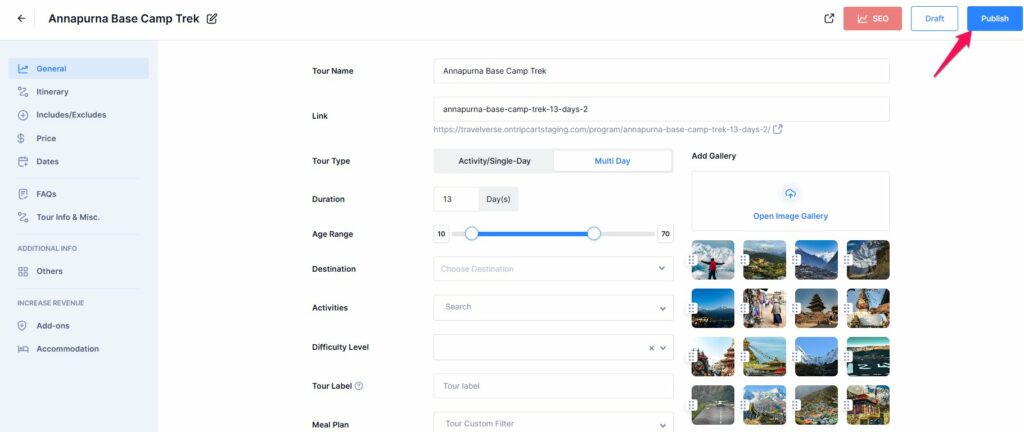
This feature helps you quickly transition your existing tours to Tripcart with minimal effort.
📧 If you face any issues or have questions, please reach out to our support team or initiate the chat located on the right.