
The Group Discount feature in Tripcart allows tour operators to offer dynamic, tiered pricing based on the size of a group. This feature helps you attract larger groups by offering competitive price variations and gives you flexibility in designing your tour pricing structure.
Group Discounts can be applied to:
- Single Price tours, and
- Multi-Package tours, where each pricing category can have its own set of group-based pricing configurations.
This makes the feature versatile and highly effective for tour operators who cater to families, corporate groups, or private tour bookings.
Benefits #
- Attract More Group Bookings
- Full Pricing Flexibility
- Works With Both Single & Multi-Package Tours
- Clear Per-Person Pricing
- Improved Competitiveness
Configuration #
Group Discounts can be configured in Single Price and Multi-Package Price settings.
A. Group Discount in Single Price Tours #
Follow the steps below to enable and set up group discounts for single-price tours:
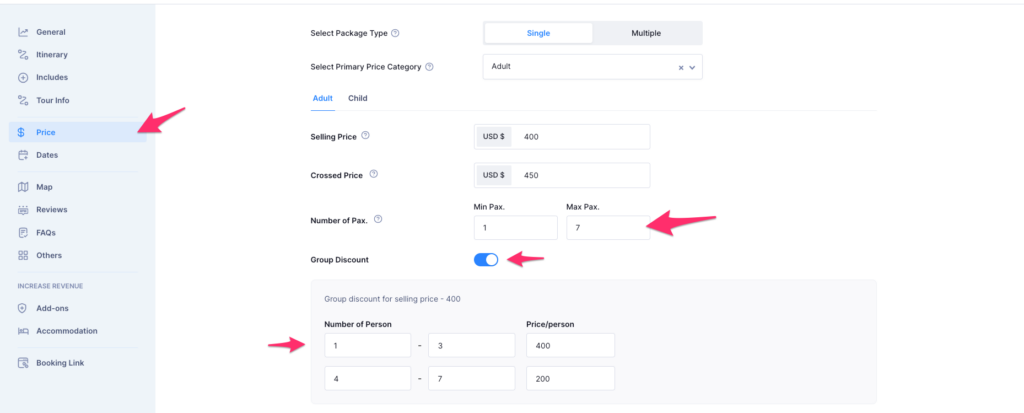
- Navigate to: Dashboard > Tours > Create Tour > Price
- Scroll to the pricing section and enable the “Group Discount” toggle.
- After enabling, you can configure:
- Group of People Range (Example: 1–4 people)
- Price Per Person for that range
(Example: $75 per person)
- To add additional group tiers, a new placeholder will automatically appear each time you enter a range, allowing you to continue adding group divisions until you reach the maximum number of people you have set.
- 5–8 people → $65 per person
- 9–12 people → $55 per person
Note: The maximum value you can set for group size depends on the Max Pax allowed for that pricing category.
B. Group Discount in Multi-Package Pricing #
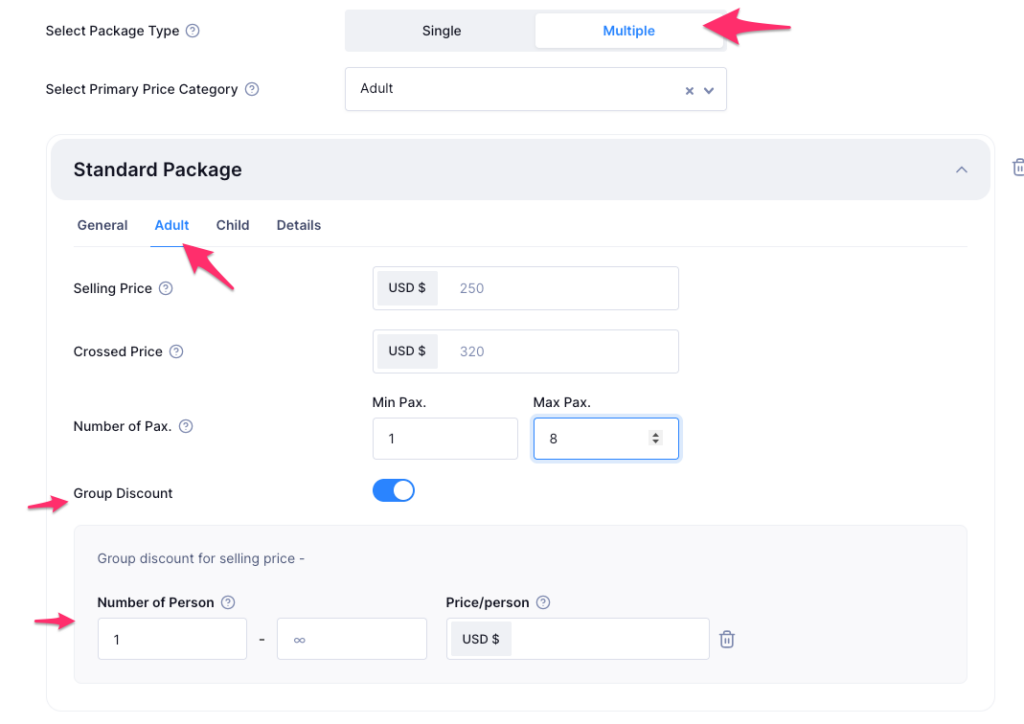
If your tour uses multi-package pricing, each package can have its own group discount configuration.
- Navigate to: Dashboard > Tours > Create Tour > Price > Multiple
- Click on the pricing category (e.g., Adult, Child, VIP, Standard).
- Enable the Group Discount toggle for that package.
- Add group size ranges and per-person pricing exactly the same way as in Single Price mode.
- Repeat this process for all pricing categories where you want to apply group-based discounts.
C. Seasonal Pricing and Group Discount #
Tripcart also allows you to set Seasonal Pricing, where pricing changes depending on specific dates or seasons.
How Seasonal Pricing Works With Group Discounts #
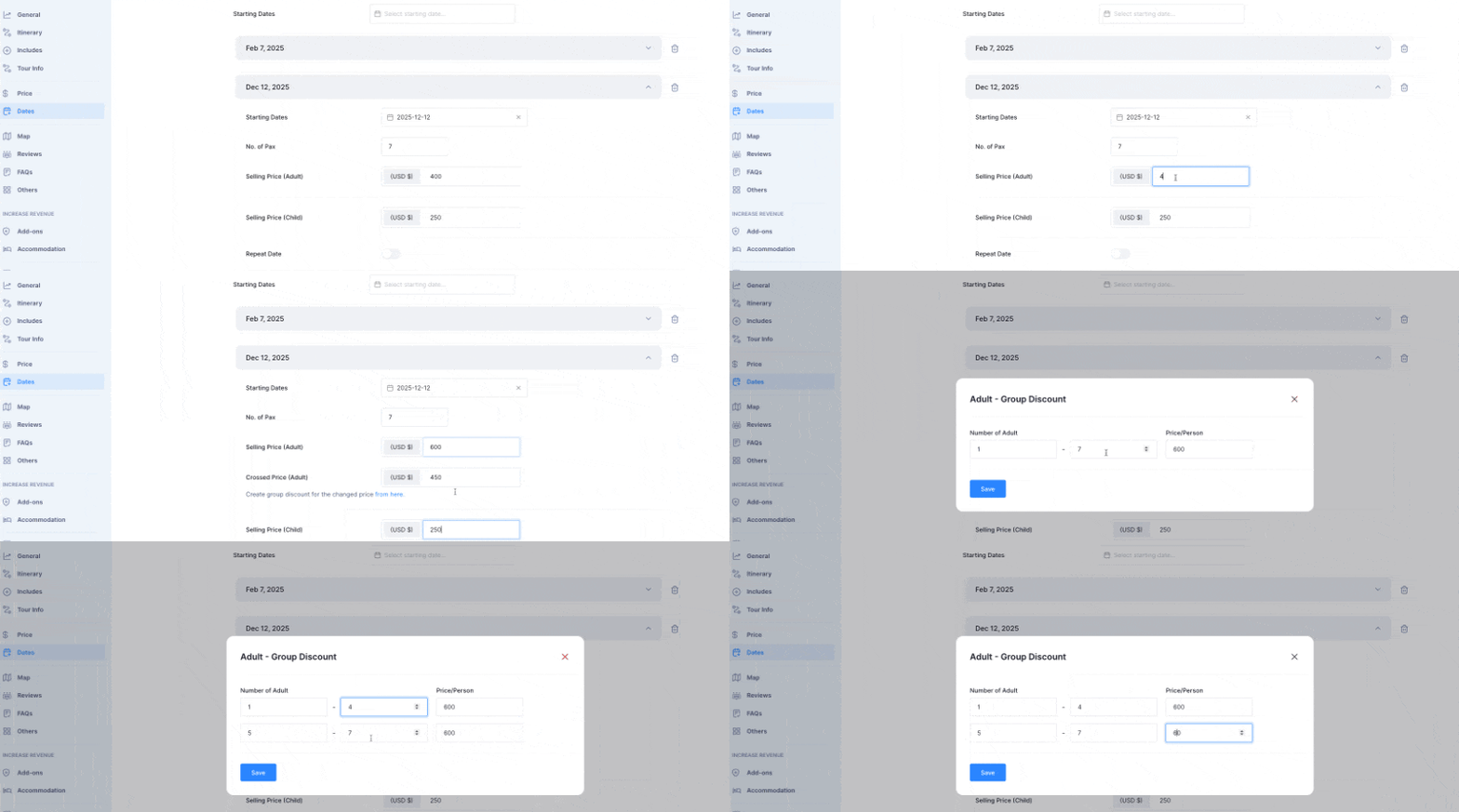
- Seasonal Pricing allows you to create different prices for different date ranges.
- When you modify the selling price for seasonal dates within a pricing category, you will also receive the option to modify the Group Discount rates for that season. You can add the price and save the changes.
This ensures that your group pricing remains accurate and aligned with the seasonal rate changes.
FAQ #
Does the group discount apply per group or per person? #
It applies per person, based on the group size range the customer falls into.
Does group discount work with seasonal pricing? #
Yes. When you change the seasonal selling price, you will also be able to adjust the group discount for that season.
Can I configure group discounts differently for each package? #
Absolutely. Each pricing category in multi-package mode can have completely separate group discount tiers.
Can I use group discount without using seasonal pricing? #
Yes. Seasonal pricing is optional and independent. Group discount works with or without seasonal pricing.
📧 If you face any issues or have questions, please reach out to our support team or initiate the chat located on the right.