
The Payment Reminder feature in the Deposit Payment settings allows tour agencies to automatically remind customers about their pending balance. When a deposit payment is accepted, the system will send an email reminder to customers based on the configured days before the due date. If the payment is completed before the reminder date, no email will be sent.
Steps to Configure Payment Reminders #
Step 1: Access Deposit Payment Settings #
- Log in to your admin panel.
- Navigate to Tour Settings from the sidebar.
- Click on Deposit Payment.
Step 2: Enable Deposit Payment #
- Toggle the Accept Deposit Payment switch to enable partial payments.
- Choose the Deposit Type:
- Percentage – Charge a percentage of the total booking cost as a deposit.
- Fixed Amount – Charge a fixed deposit amount per traveler.
- Enter the Deposit Percentage or Fixed Amount as required.
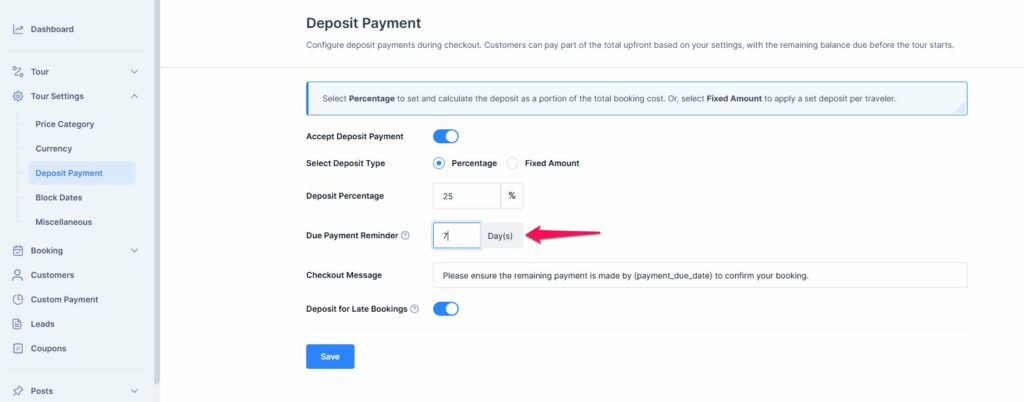
- Locate the Due Payment Reminder field.
- Enter the number of days before the final payment due date when the system should send the reminder email.
- Customize the Checkout Message to inform customers about the remaining payment deadline. Example:”Please ensure the remaining payment is made by {payment_due_date} to confirm your booking.”
- Click the Save button to apply the changes.
- The system will send automated email reminders based on the specified number of days before the due date.
📧 If you face any issues or have questions, please reach out to our support team or initiate the chat located on the right.