
The Tour Highlights section in Tripcart allows tour operators to showcase key attractions, experiences, and unique aspects of a tour. This helps potential customers quickly understand the main selling points of the tour, making it easier for them to make a booking decision.
Accessing the Tour Highlights Section #
- Log in to your Tripcart admin dashboard.
- In the left sidebar menu, navigate to Tour Settings.
- Click on Miscellaneous to open the miscellaneous settings panel.
- Locate the Tour Highlights Tab
How to Add Tour Highlights #
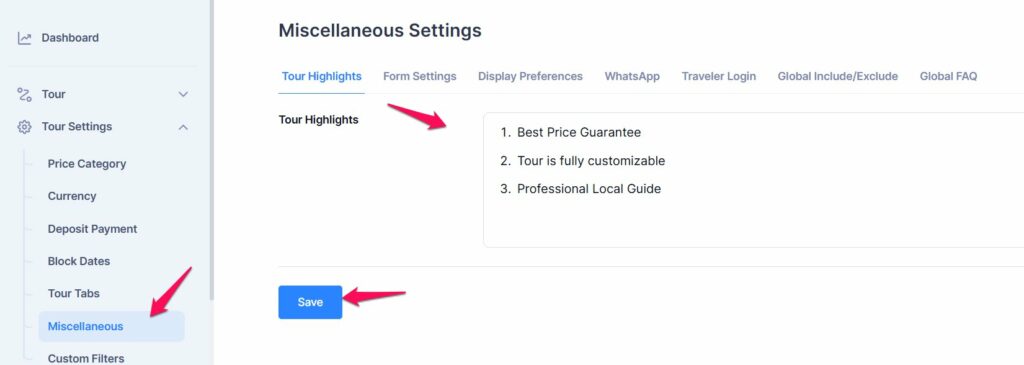
- Click on the Tour Highlights text field.
- Enter key highlights of the tour. Each highlight should be a short, engaging statement that captures the essence of the experience.
- Use bullet points or numbered lists for better readability.
- Click the Save button to store your changes.
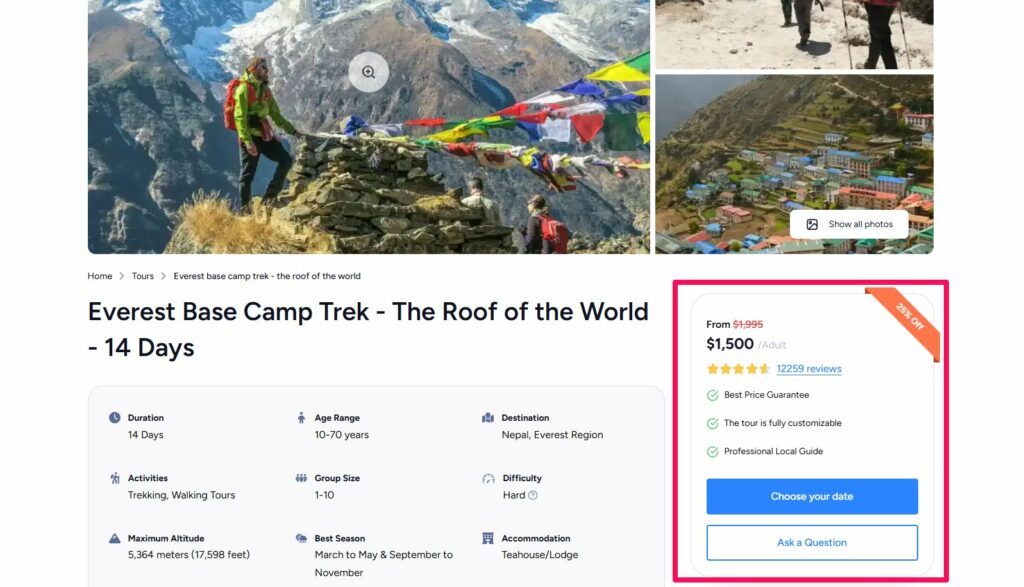
- It will display under the Pricing Widget in the Tour Detail page
📧 If you face any issues or have questions, please reach out to our support team or initiate the chat located on the right.