
Accommodation refers to the places where travelers stay during their trip, such as hotels, resorts, guesthouses, or other types of lodging. In Trip Cart, accommodation options can be added and managed for different tour packages.
How to Add Accommodation: #
- Navigate to Dashboard > Tours > Accommodation.
- Click on the Add Room Type button to add a new accommodation option.
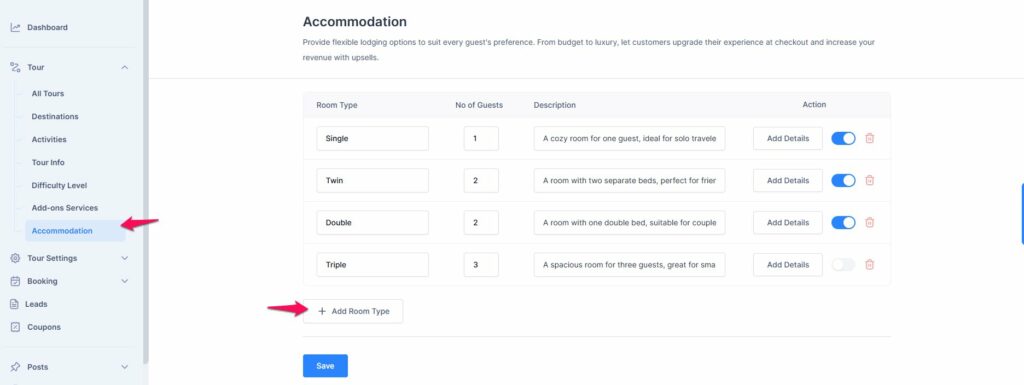
After clicking the Add Room Type button, follow these steps to add a new accommodation:
- Room Type: Enter the name of the room (e.g., Single, Double, Suite).
- Number of People: Specify the number of people the room can accommodate.
- Description: Provide a detailed description of the room, including any special features or amenities.
- Additional Details: If needed, add further details or features, such as bed size, views, or inclusions.
- Use the toggle to enable this room type for inclusion in each tour package.
- If you no longer offer the room type, click the Delete button to remove it from the system.
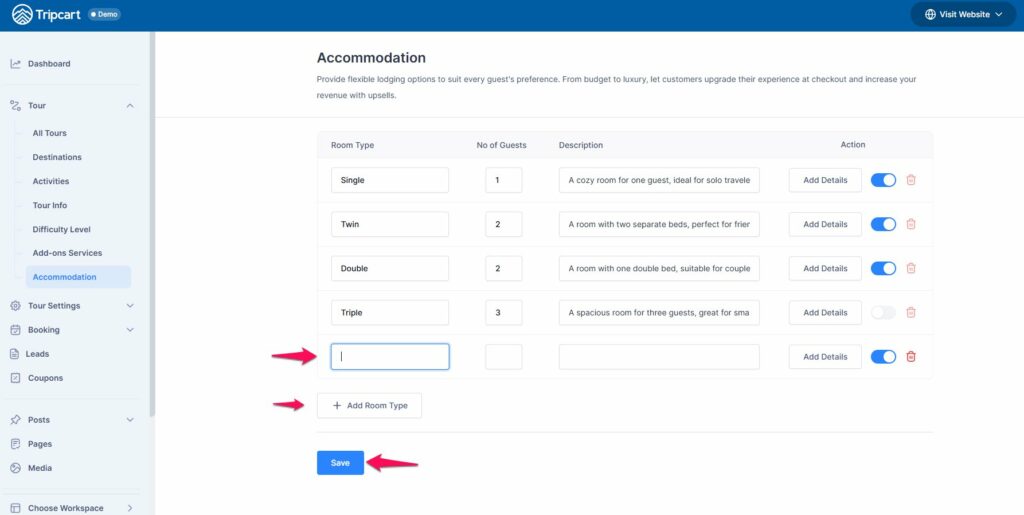
Once all details are filled out, click Save to add the room type to your accommodations list.
📧 If you face any issues or have questions, please reach out to our support team or initiate the chat located on the right.