
The theme provides a built-in feature that allows you to assign meal plans for each day of your tour itinerary. These meal options appear as a selectable list inside the Itinerary section of any tour.
Before you can select meals for an itinerary day, you first need to set up the available meal options from the Tour Settings.
How to Add and Manage Meal Options #
You can add, edit, and manage meal options directly from the Tripcart dashboard.
Step 1: Navigate to Meal Options Settings #
- Go to Dashboard
- Open Tour Settings
- Click on Miscellaneous
- Select Meal Options
This page contains the full list of meal options that can be used throughout your tours.
Default Meal Options #
The system comes with three default meal options:
- Breakfast
- Lunch
- Dinner
These default items can be:
- Edit to match your preferred language or terminology
- Reordered to change the order in which they appear in the dropdown list
However, they cannot be deleted.
Adding New Meal Options #
If you want to offer additional meal categories (e.g., Snacks, Drinks, Packed Lunch), you can add them manually.
To add a new meal option: #
- Click the Add Meal Option button.
- Enter the name of the meal option.
- Click Save to apply the changes.
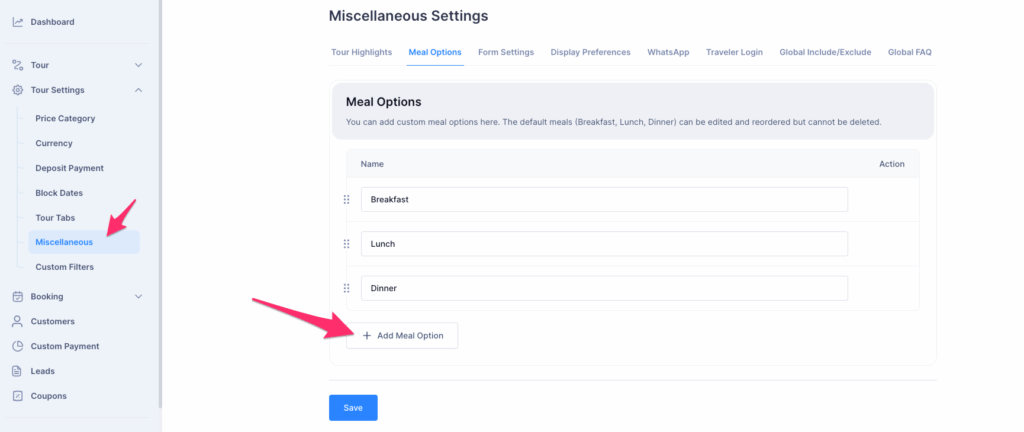
Your newly added meal option will now appear in the list alongside the default items, and you can reorder or delete it if needed. You edit it as per your requirement as well.
Using Meal Options in a Tour Itinerary #
Once meal options are added, they become available for selection inside each tour’s itinerary builder.
To select meal options for a tour: #
- Go to Dashboard > Tours.
- Open the tour where you want to add or edit an itinerary.
- Scroll to the Itinerary Section.
- In the Meals field for that day, you will see a list of all available meal options, including:
- Default meal options
- Custom meal options you added
- Choose the meal(s) that apply to that itinerary day.
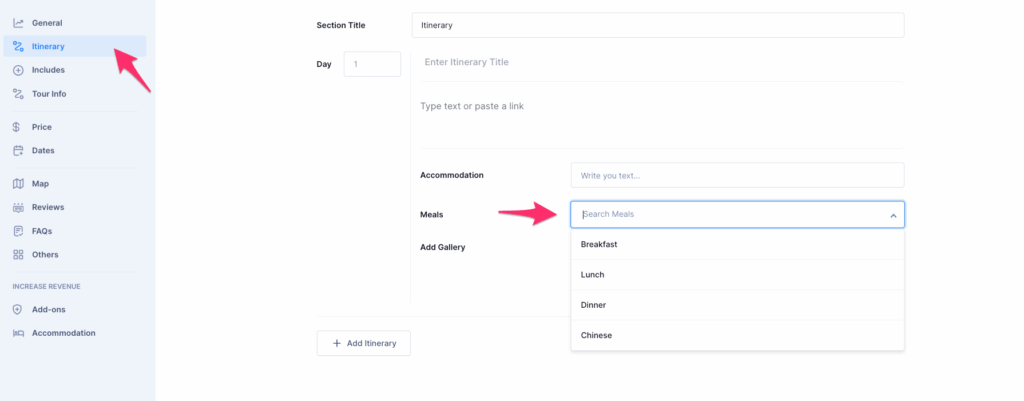
The selected meal options will then be displayed in the itinerary details on the tour’s frontend.
📧 If you face any issues or have questions, please reach out to our support team or initiate the chat located on the right.