
The Block Dates feature in Tripcart allows tour operators to set specific dates when all tours will be unavailable for booking. This is useful for managing non-operational days, public holidays, maintenance periods, or any other dates when tours should not be booked.
Accessing the Block Dates Settings #
- Log in to your Tripcart admin dashboard.
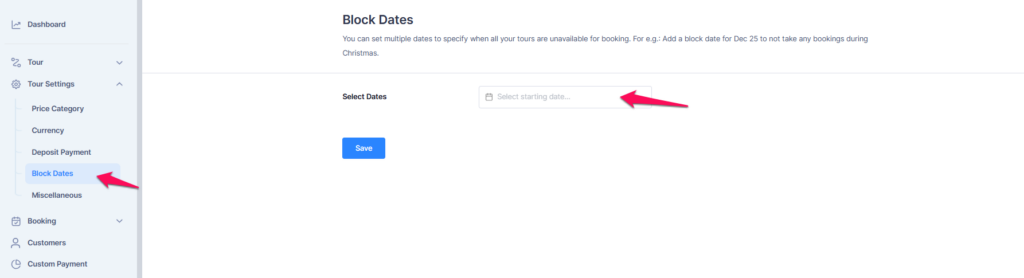
- In the left sidebar menu, navigate to Tour Settings.
- Click on Block Dates to open the block dates management panel.
Adding Block Dates #
- Click on the Select Dates field.
- Choose the date for when bookings should be blocked.
- If you need to block multiple dates, pick all those dates.
- If you need to block the date every year, enable the ‘Repeat every year:‘ toggle to repeat it.
- Click the Save button to confirm the blocked dates.
Use Cases for Blocking Dates #
- Public Holidays – Example: Block December 25 for Christmas.
- Maintenance Periods – If your tours require scheduled downtime.
- Seasonal Closures – Block an entire season if your tours only operate at specific times of the year.
- Personal Events – Prevent bookings when the tour operator is unavailable.
📧 If you face any issues or have questions, please reach out to our support team or initiate the chat located on the right.