
Tripcart allows travel businesses to securely connect external systems or custom applications to their Tripcart account using API keys.
With API keys, you can programmatically access and manage data such as:
- Bookings
- Customers
- Inquiries
- Tours
- Payments
This eliminates manual data handling, improves accuracy, and speeds up integrations.
Note: This feature is available in the Scale Plan only.
What is an API Key #
An API key is a unique identifier used to authenticate requests between your Tripcart account and an external application or system. It ensures that only authorized applications can access your Tripcart data.
Why Use API Keys? #
- Automate data retrieval and updates
- Integrate Tripcart with CRMs, analytics dashboards, and automation tools
- Control access with fine-grained permissions
- Eliminate manual data exports/imports
- Improve data accuracy and sync speed
How to Access API Key #
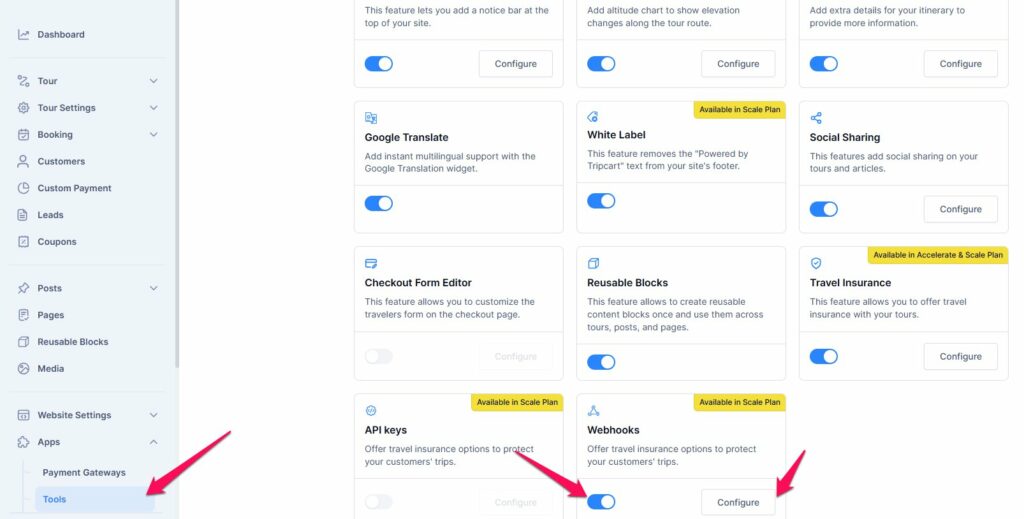
- Log in to the Tripcart Dashboard.
- In the left sidebar, navigate to Apps > Tools.
- Locate the API Keys option.
- Toggle the switch to Enable API Keys.
- Click the Configure button to proceed.
How to create API Key #
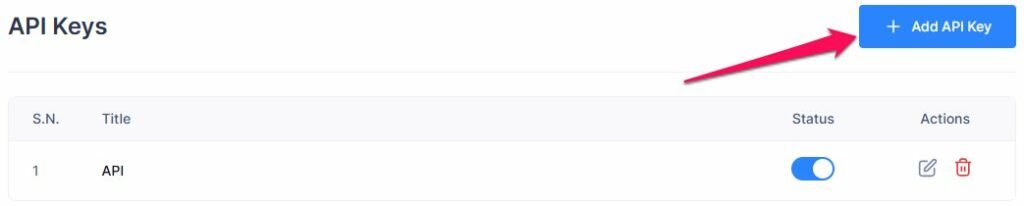
- Click Add API Key button
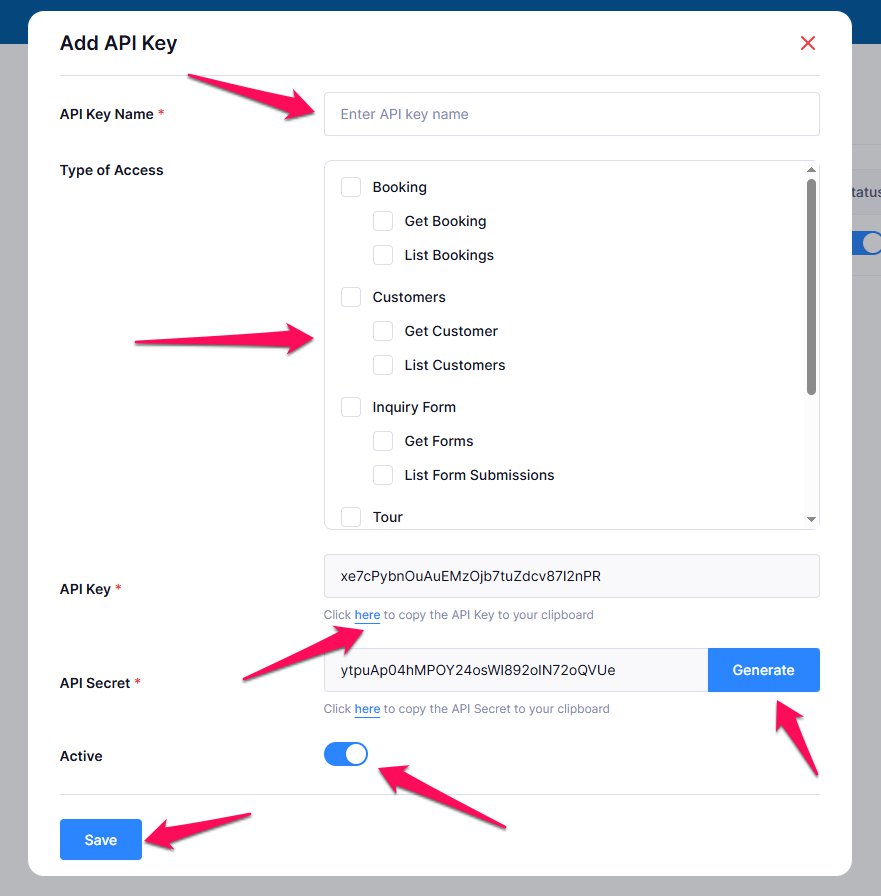
- Fill in:
- API Key Name: e.g.,
CRM Integration,Analytics Dashboard - Permissions: Select the access types you need (see table below)
- API Key Name: e.g.,
- API Key & API Secret:
- By default, both API Key and API Secret are automatically generated when you create a new key.
- If you refresh the page, both values will change.
- You can also manually click Generate to create a new API Secret without changing the API Key.
- Toggle Active
- The API key is turned ON by default to allow access immediately.
- You can toggle it OFF anytime to temporarily revoke access without deleting the key.
- Click Save
Note: You can create up to 5 API keys per account.
Permission Types #
| Category | Permission | Description |
|---|---|---|
| Bookings | Get Booking | Retrieve detailed booking info, including traveller’s details, payment status, trip info, etc. |
| List Bookings | Retrieve a summary list of all bookings (traveller’s name, booking date, status, etc). | |
| Customers | Get Customer | Retrieve details of a specific traveller’s(contact info, payments, etc). |
| List Customers | Retrieve a list of all registered customers. | |
| Inquiry Forms | Get Forms | Retrieve the details of a particular inquiry form that has been selected in Form Settings |
| List Form Submissions | Retrieve all form submissions, including submitted data. | |
| List Form | Retrieve a paginated list of forms. | |
| Get Form Submission | Returns details of a specific form submission. | |
| Tours | Get Tour | Retrieve details of a specific tour (description, price, tour type, itinerary, etc). |
| List Tours | Retrieve a list of all tours (title, duration, price, etc). | |
| Payments | Get Payment | Retrieve payment details (amount, status, traveller’s info, etc). |
| List Payments | Retrieve a list of processed payments with statuses (pending, completed). |
Managing API Keys #
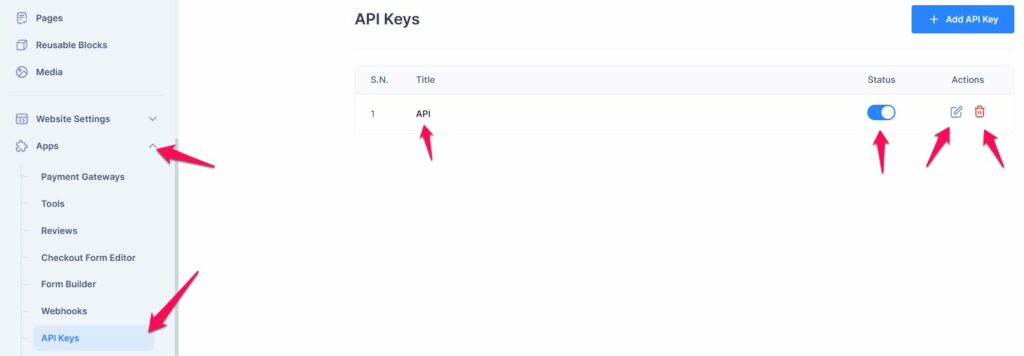
To manage API keys, go to Dashboard > Apps > API Keys. Each API key displays the following details:
- Title: shows the name of the API key.
- Status: shows whether the API key is ON (active) or OFF (disabled).
- Actions: options to Edit permissions or Delete the API key.
This layout makes it easy to see each API key’s configuration, status, and available actions at a glance.
API Keys Integration #
To integrate with Tripcart APIs, every request must include your API Key and API Secret in the HTTP headers to authenticate.
All API requests must be made using the GET method.
| Header Name | Value Example | Required |
|---|---|---|
X-API-Key | your_api_key | Yes |
X-API-Secret | your_api_secret | Yes |
Note: If authentication headers are missing or incorrect, the API will return an authentication error.
Base URL #
Use {{origin}} as your base URL variable (e.g., https://yourdomain.com).
Pagination & Filtering #
page({page_number}) – Optional.
Specifies which page of results to retrieve. Defaults to the first page if not provided.per_page– Optional.
Number of results per page. Default: 15.key– Optional (available for certain APIs).
Allows filtering of data by name, email, or phone.
If not provided, all available records for the requested page will be returned.
API Endpoints and Examples #
1. Bookings #
Get Booking #
- Method: GET
- Endpoint:
{{origin}}/api/_v1/booking/{id} - Description: Retrieve booking details by booking ID.
- Keys:
- id (required) – Booking Id.
- Example Request:
GET {{origin}}/api/_v1/booking/dHpIS0FuQlR6N1dtd3R1VVNnT2pJUT09
Headers:
X-API-Key: your_api_key
X-API-Secret: your_api_secret
List Bookings #
- Method: GET
- Endpoint:
{{origin}}/api/_v1/bookings?page={page_number} - Description: Retrieve a paginated list of bookings
- Keys:
page(optional) – Page number (default = 1).per_page(optional) – Results per page (default = 15).
- Example Request:
GET {{origin}}/api/_v1/bookings?page=1
Headers:
X-API-Key: your_api_key
X-API-Secret: your_api_secret
2. Customer #
Get Customer #
- Method: GET
- Endpoint:
{{origin}}/api/_v1/customer/{id} - Description: Retrieve details of a customer by their ID or email address.
- Keys:
email– Customer email address.- id – Customer Id.
- Example Request:
GET {{origin}}/api/_v1/customer/john.doe@example.com
Headers:
X-API-Key: your_api_key
X-API-Secret: your_api_secret
List Customers #
- Method: GET
- Endpoint: {{origin}}/api/_v1/customers?page={page_number}&per_page={page_number}&key={search_key}
- Description: Retrieve a paginated list of customers.
- Keys:
page(optional) – Page number (default = 1).per_page(optional) – Results per page (default = 15).key(optional) – Filter by name, email, or phone.
- Example Request:
GET {{origin}}/api/_v1/customers?page=1
Headers:
X-API-Key: your_api_key
X-API-Secret: your_api_secret
3. Payments #
Get Payment #
- Method: GET
- Endpoint:
{{origin}}/api/_v1/payment/{id} - Description: Retrieve payment details for the given payment ID.
- Keys:
- id (required) – Payment Id.
- Example Request:
GET {{origin}}/api/_v1/payment/RkFuRnQ2ZFQ0V2lRaS9uekdVOGZqdz09
Headers:
X-API-Key: your_api_key
X-API-Secret: your_api_secret
List Payment #
- Method: GET
- Endpoint:
{{origin}}/api/_v1/payments?page={page_number}&per_page={count} - Description: Retrieve a paginated list of payments.
- Keys:
page(optional) – Page number (default = 1).per_page(optional) – Results per page (default = 15).
- Example Request:
GET {{origin}}/api/_v1/payments?page=1Headers:
X-API-Key: your_api_key
X-API-Secret: your_api_secret
4. Tours #
Get Tour #
- Method: GET
- Endpoint:
{{origin}}/api/_v1/tour/{slug} - Description: Retrieve details of a specific tour by its slug.
- Keys:
tour_slug(required) – Unique slug for the tour.
- Example Request:
GET {{origin}}/api/_v1/tour/awesome-tour
Headers:
X-API-Key: your_api_key
X-API-Secret: your_api_secret
List Tours #
- Method: GET
- Endpoint:
{{origin}}/api/_v1/tours?page={page_number}&key={search_key} - Description: Retrieve a paginated list of tours.
- Keys:
page(optional) – Page number (default = 1).per_page(optional) – Results per page (default = 15).key(optional) – Filter by tour title.
- Example Request:
GET {{origin}}/api/_v1/tours?page=1&key=Everest
Headers:
X-API-Key: your_api_key
X-API-Secret: your_api_secret
5. Inquiry Form #
Get Form #
- Method: GET
- Endpoint:
{{origin}}/api/_v1/form/{id}/fields - Description: Retrieve details of a form by its ID or Slug.
- Keys:
- id – Inquiry form ID.
slug– Unique slug of form.
- Example Request:
GET {{origin}}/api/_v1/form/TFdqcm9rYXpET01qZFFmR1VtaXhKUT09/fields
Headers:
X-API-Key: your_api_key
X-API-Secret: your_api_secret
List Forms #
- Method: GET
- Endpoint:
{{origin}}/api/_v1/forms?page={page_number}&per_page={count} - Description: Retrieve a paginated list of forms.
- Keys:
page(optional) – Page number (default = 1).per_page(optional) – Results per page (default = 15).
- Example Request:
GET {{origin}}/api/_v1/forms?page=1
Headers:
X-API-Key: your_api_key
X-API-Secret: your_api_secret
List Form Submissions #
- Method: GET
- Endpoint:
{{origin}}/api/_v1/form/{form_id}/submissions?page={page_number}&per_page={count} - Description: Retrieve a paginated list of submissions for the given form.
- Keys:
page(optional) – Page number (default = 1).per_page(optional) – Results per page (default = 15).
- Example Request:
GET {{origin}}/api/_v1/form/YTZTUHJpZDU5VU8rRWN0M1JWZFpCUT09/submissions
Headers:
X-API-Key: your_api_key
X-API-Secret: your_api_secret
Get Form Submissions #
- Method: GET
- Endpoint:
{{origin}}/api/_v1/form/submission/{submission_id} - Description: Retrieve details of a specific form submission.
- Keys:
- id (required) – Inquiry form ID.
- Example Request:
GET {{origin}}/api/_v1/form/submission/bkNMeUd1OXZ1aTNzbVpxbDRGRXYvUT09
Headers:
X-API-Key: your_api_key
X-API-Secret: your_api_secret